Installing plugins
Learn how to install and manage plugins in Spotube
Let's first learn how to install plugins in Spotube. It's pretty simple.
- Open Spotube (duh!)
- Go to Settings
- Then go to the top option, "Metadata provider plugins"
- You can see a list of all the plugins that are available to install
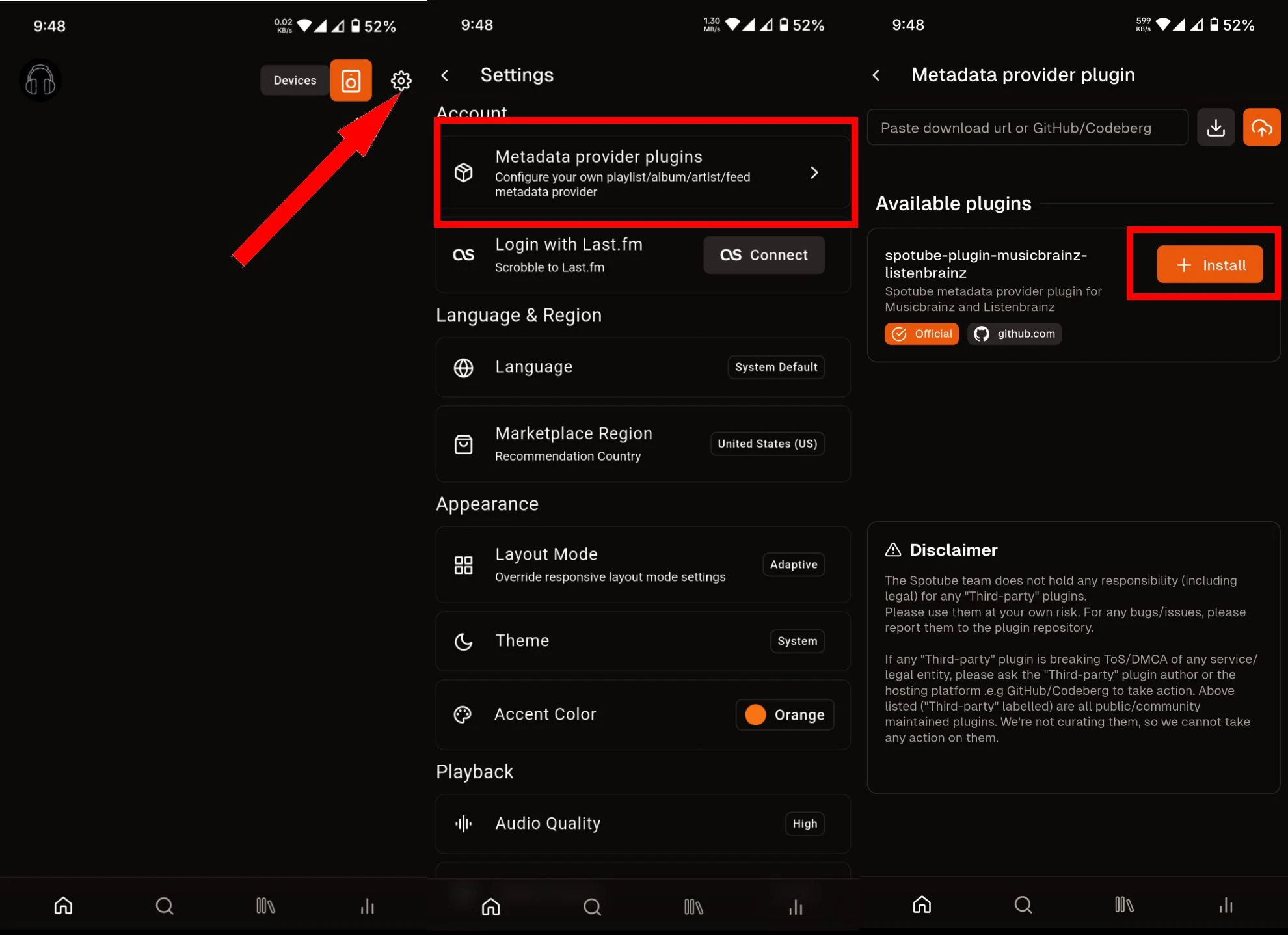
More ways to install new plugins
Spotube lists plugin repositories from GitHub and Codeberg in the Available plugins section. This is a non-curated list, so be careful when installing plugins. Always check the source before installing. A malicious plugin can easily steal your credentials. So be careful!
Try to use the Official tagged plugins all the time if you don't want to deal with potential security risks.
- Upload plugin from local file: Install plugins from a local file (
plugin.smplug) using the orange upload button on the top right beside the text field. - Install plugin from URL: If you have a direct link to a
.smplugfile, paste the URL in the text field and use the gray download button beside it.
If you're a developer, Spotube plugins are built with Kotlin/JS using the Zipline runtime. Check out the Plugin Development Guide to get started.